If you used to read Everything Technical Writing, you’ve probably noticed that things look entirely different around here. New name, new colors, new energy. Let me explain exactly what happened.
Where This All Started
I started this blog when I moved from software engineering into technical writing. Back then, I wrote about what I was learning as I was learning it, including how to break in, how to build a portfolio, how to interview, and how to write docs that developers actually want to read.
In 2022, I was absolutely on fire and published 21 articles. But then life happened. In 2023, I took on a demanding new role, so I only managed to write seven. By 2024, I started my MBA program, which dropped my output to four articles, and in 2025, just three.
Thirty-seven posts in total. Even as my writing slowed down, this little blog was quietly working in the background, helping a lot of people start and grow their careers. I still have the kind messages and virtual coffees to prove it. Looking at that timeline, it is clear that while the publishing slowed down, my professional world was completely reshaping itself.
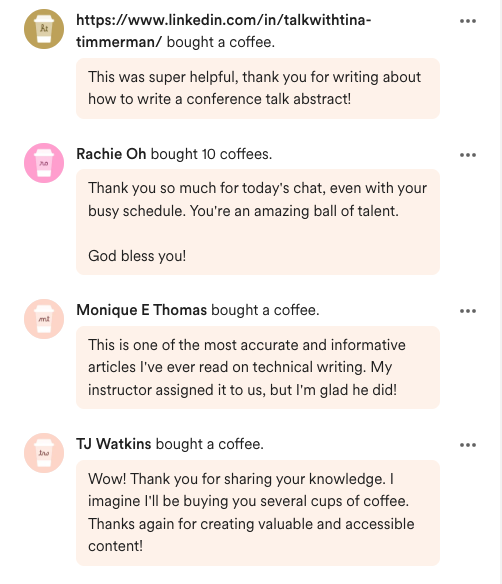 A few of the messages that made the last five years worth it.
Why the Change?
Lately, the urge to write has been pulling at me again. A big catalyst is that my first book, A Friendly Guide to Developer Advocacy, just got published, and I have so many frameworks from it that I want to unpack and share here.
But it’s also because my work has expanded. I’m still deeply rooted in developer education, but my lens has shifted from pure execution to strategy. These days, I think less about how to write a specific document well, and more about what we should teach, who we are teaching, how education drives product adoption, and how to prove that value to the business.
The Everything Technical Writing brand simply couldn’t hold the new direction I’m heading in, so it was time to evolve. Welcome to Everything Product Education :)
The Rebuild (Or: How I Rescued My Blog)
Step 1: Discovering there was nothing to migrate
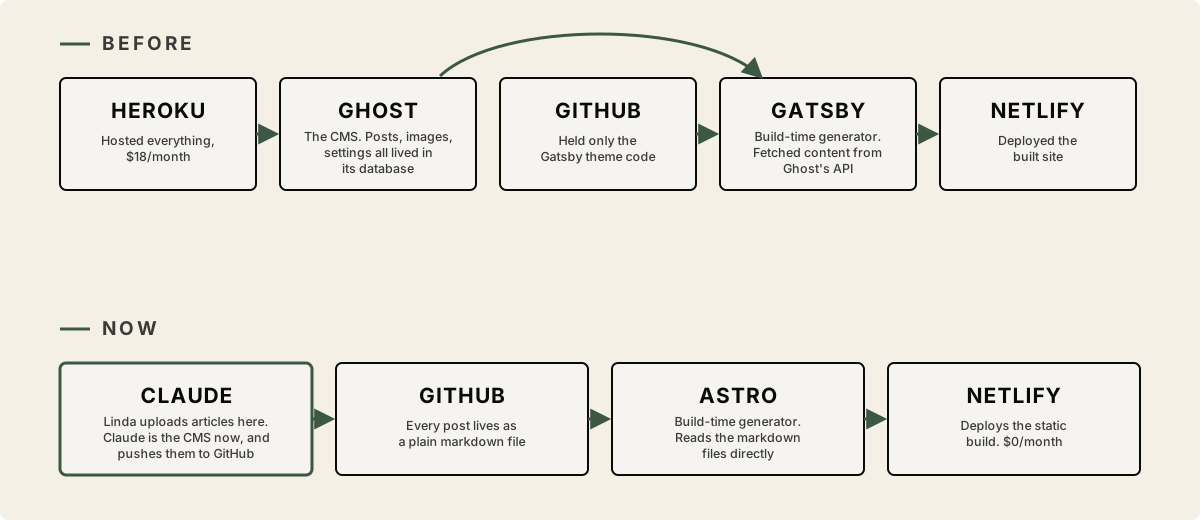
My old blog ran on Ghost, a blogging CMS I self-hosted on Heroku. That setup cost me about $18 every month, and for a blog I wasn’t actively writing on or making any money from, that felt kind of insane. So earlier this year I let my subscription lapse. My account got deleted, and I completely forgot to download a backup before that happened.
The plan was to migrate from that Ghost and Heroku setup to GitHub instead, where the blog would live as plain files in my own repository and deploy for free straight from there. No server to pay for or keep alive. What I hadn’t fully considered was that Ghost stores your actual posts, images, and settings inside Heroku. My GitHub repo only ever held the theme and templates. So when Heroku deleted my account, the code survived, but everything it was built to display, including all 37 posts and every image, was gone with it.
That meant if I migrated as planned and pushed that repo to GitHub, Netlify would deploy it without complaint. It just wouldn’t have anything on it. Every one of those 37 post URLs would return a 404, and five years of SEO would go right down the drain with them. My options were to never touch the GitHub repo again so Netlify would never deploy the emptiness, or to start the blog over with zero history. I felt completely doomed either way.
Step 2: Getting the words back from the Wayback Machine
Huge shoutout to Claude here, because I was honestly about to throw in the towel when it suggested recovering my posts from the Wayback Machine.
I’ve always known about the Wayback Machine, but I just never actively thought about how awesome it actually is. It is a project by the Internet Archive that has been crawling the entire public web for decades, taking snapshots of pages exactly as they existed on the day it visited them. The text, the images, and the layout are all timestamped and stored. Millions of sites and billions of pages are kept for free by an organization whose whole job is making sure the internet doesn’t quietly disappear.
What I’d been paying Heroku $18 a month to hold, the Wayback Machine had been saving for nothing all along. My scrappy little blog was right there. Every single post and every single image was saved in snapshot after snapshot going back years. Someone, somewhere, had decided my blog and millions of others were worth remembering, even though I hadn’t backed it up myself.
Step 3: Making the old skeleton walk again
The surviving skeleton of the site was built with Gatsby, a React-based static site generator that was everywhere around 2019. It was originally built to pull content from Ghost’s API, which no longer existed.
So the first real rework was teaching the Gatsby site to build from the recovered markdown files instead. That actually worked, and for a brief moment, the blog was alive again and looking exactly like it did before. But my Gatsby setup was ancient. It needed a years-old version of Node just to build, it dragged in a massive GraphQL data layer just to render a simple blog, and half its plugins existed purely to talk to a Ghost CMS that was long gone. I had to decide between patching Gatsby or rebuilding on something modern.
In the end, we decided to rebuild with Astro. Astro is a modern web framework designed specifically for content-driven websites like blogs or portfolios. It treats markdown as a first-class citizen, ships zero JavaScript by default so the site is fast without even trying, and the whole build is simple enough that I can actually understand it.
Step 4: The redesign
With the engine rebuilt, we finally got to the fun part. I asked Claude to design the new brand based on my personal website, with a few fresh additions. And here is a very “me” problem, because I could not settle on a color palette. So we just didn’t choose.
This website now has three distinct themes, sage, butter, and blush, and you can switch between them right now with the little colored dots in the top menu. I also added a proper page for the book where you can flip through real pages of Chapter 4 for free, and the best part is that my monthly hosting bill now costs me exactly $0.
Welcome to Everything Product Education
This is where I’ll share my own experiences, alongside the hard-won insights of others, on using product education as a growth engine. You can expect real-world notes on strategy, frameworks, distribution, AI workflows, and proving the business value of education.
If you’re a technical writer, developer advocate, product marketer, or content strategist, and your work involves helping users understand, trust, and adopt technical products, you are home. Everything that helped you here before is still right where you left it. There’s just a lot more coming.
What to Expect Next
I’m restarting the newsletter on a monthly cadence, and if life permits, I’ll pick it up to once every two weeks. You can look forward to teardowns, frameworks from the book, and honest notes from the strategy seat.
I would love to hear from you as this new chapter begins. What are you wrestling with in your own product education work right now? Reply to this newsletter or find me on LinkedIn to tell me your thoughts.
See you on the other side.